Reliable Ethernet connectivity often depends on more than choosing a converter with the right port speed. Fiber type, optical transceiver compatibility, link distance, connector condition, installation quality, and network configuration all influence whether a fiber link performs as expected. For businesses deploying a gigabit media converter multimode solution, a systematic approach can reduce installation problems and provide a more stable foundation for surveillance, industrial networking, and enterprise infrastructure.
Match the Converter With the Multimode Fiber
The first step is to confirm that the media converter and optical module are designed for the multimode fiber being deployed. Multimode fiber commonly uses a 50-µm or 62.5-µm core, while laser-optimized OM3 and OM4 fibers are widely used for higher-speed Ethernet applications.
Wavelength also matters. Many multimode Ethernet systems use 850 nm optical transmission, particularly with VCSEL-based transceivers. Corning identifies OM3 and OM4 as laser-optimized multimode fibers designed around 850 nm transmission, with OM4 providing higher effective modal bandwidth than OM3.
Therefore, installers should verify the fiber type, optical wavelength, connector, transmission standard, and supported distance before connecting equipment. Treating all multimode fiber as interchangeable can create compatibility problems or unnecessarily limit the available link distance.
Calculate Distance Before Installation
Link distance should be evaluated before equipment is purchased or installed. A converter may support Gigabit Ethernet electrically, but the optical side still depends on the transceiver, fiber type, and optical budget.
For example, Corning’s published guidance shows that 1000BASE-SX can support substantially longer distances over multimode fiber than many higher-speed Ethernet standards. The exact reach depends on the fiber category and optical components used.
Network planners should also account for patch cords, connectors, splices, and other components in the optical path. Cisco documentation emphasizes calculating optical power margins rather than assuming that a nominal cable distance alone determines reliable transmission.
A practical deployment therefore begins with a link budget and route survey. This helps prevent a situation where a converter appears suitable on paper but performs poorly after all connection losses are included.
Keep Fiber Connectors Clean
Clean optical interfaces are essential for stable fiber transmission. Dust, contamination, or damaged connector end faces can introduce additional loss and cause intermittent connectivity.
Cisco recommends cleaning fiber-optic cables before attachment because dirty connectors can cause optical interfaces to appear nonfunctional. It also advises careful handling to prevent connector end faces from being scratched or damaged.
For commercial or industrial deployments, technicians should inspect and clean connectors using appropriate fiber-cleaning procedures before final connection. Protective caps should remain in place whenever ports or fiber ends are not being used.
This simple practice can reduce troubleshooting time considerably. When a link fails, installers should check the physical optical path before assuming that the converter itself is defective.
Verify Transceiver and Fiber Compatibility
A gigabit media converter multimode deployment may involve an SFP rather than an integrated optical interface. This creates another compatibility point that should be checked carefully.
The SFP must match the converter’s supported interface and the optical characteristics of the installed fiber. Network engineers should verify the transceiver’s wavelength, fiber type, transmission speed, connector type, and specified reach. Where legacy multimode fiber is involved, special requirements may also apply.
Cisco notes that mode-conditioning patch cords can be required for certain 1000BASE-LX/LH applications over older multimode fiber types. However, such requirements do not apply universally, so installers should follow the transceiver manufacturer’s specifications instead of applying one solution to every multimode link.
Consider the Network’s Actual Application
The converter should be selected according to the traffic and environment it will support. A network carrying ordinary office traffic may have different requirements from a video surveillance system transmitting continuous high-resolution streams.
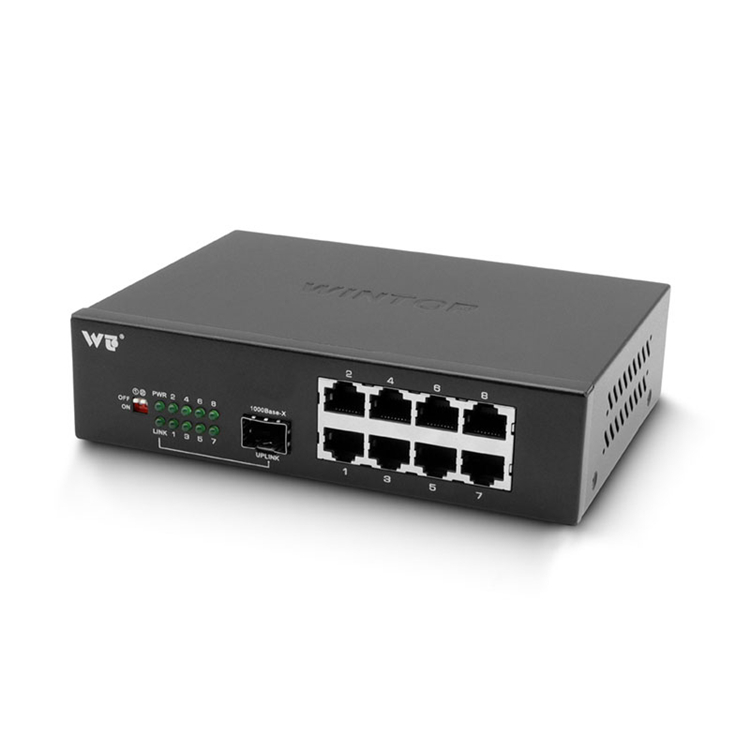
Wintop’s WT-DS209-1GF8GT is designed for applications including network HD monitoring and network engineering. It provides eight 10/100/1000BASE-T RJ45 ports and one 1000BASE-X SFP interface, combining copper connectivity with an optical uplink.
The product also incorporates electrostatic and surge protection circuits. Its one-key VLAN configuration can support port isolation and network storm suppression, while its video channel mode can establish a one-to-one channel arrangement between corresponding downlink ports of two identical devices.
Plan for Long-Distance and Specialized Modes
Distance requirements should be considered together with the application rather than treated as a secondary specification. Wintop’s WT-DS209-1GF8GT supports a long-distance mode that forces the downlink port rate to 10BASE-T after configuration. According to the supplied product information, this mode provides a downlink transmission distance of 0–300 meters.
Such a function can be useful in specific network engineering and surveillance deployments where extended copper runs are required. However, network planners should clearly distinguish between the optical link and the converter’s special copper-port operating mode when designing the overall topology.
Build a Deployment That Is Easy to Maintain
Good converter deployment should also consider future maintenance. Equipment should be installed where technicians can access power, copper ports, optical connections, and status indicators without disrupting other network components.
Labeling fiber pairs and documenting converter locations, SFP specifications, link distances, and connected equipment can simplify future troubleshooting. Network teams should also maintain records of VLAN settings and any specialized operating modes.
Building a More Reliable Multimode Deployment
Successful multimode media-converter deployment depends on matching the optical components, calculating the link requirements, maintaining clean connections, and configuring equipment according to the application. These practices are particularly valuable for business networks where downtime can affect surveillance, production, communications, or other operational systems.
Wintop is a network equipment supplier and national high-tech enterprise specializing in the R&D, production, and sales of optical modules and switches. Its WT-DS209-1GF8GT combines eight Gigabit RJ45 ports with a 1000BASE-X SFP interface and application-oriented features for network monitoring and engineering. Contact Wintop to discuss a suitable media converter solution for your network deployment.